This applies to: Visual Data DiscoveryBox plots are based on one metric and one or more attributes. Groups and subgroups to expand the depth of the information you provide in this visual type. Box plot visuals can be used only with data sources that use connectors that support percentile calculations necessary for box plots.
Note: To edit the number or date and time format for this visual, see Configure Number Formatting for Visuals and Configure Date and Time Formatting for Visuals.
Support for this feature by connector is shown in the following table.Key:Y- Supported; N- Not Supported; N/A - not applicable
Connector
Supported?
Notes
Amazon Redshift
Y
Amazon S3
Y
Apache Drill
Y
Apache Phoenix
N
Apache Phoenix Query Server (QS)
N
Apache Solr
Y
BigQuery
Y
If you need to access a BigQuery partition, explicitly include an alias for the built in partition column in your select clause, such as select *, _PARTITIONTIME as pt from projectId.datasetId.tableId.
Business Central Jet
Y
Cloudera Impala
Y
Cloudera Search
N
The Apache Solr versions prior to 5.3 used by Cloudera Search do not have the percentile aggregations required for box plots built in.
Couchbase
N
Dremio
Y
Elasticsearch 7.0
Y
Elasticsearch 8.0
Y
File Upload
Y
HDFS
Y
Hive
Y
Jira
Y
MemSQL
Y
Microsoft SQL Server
Y
MongoDB
N
Mongo DB data stores do not support the kind of aggregation needed for box plots out of the box.
MySQL
N
Oracle
Y
PostgreSQL
Y
Python
Y
Real Time Sales
Y
Salesforce
Y
SAP Hana
Y
SAP S/4HANA
N
SAP IQ
Y
Spark SQL
Y
Snowflake
Y
Teradata
Y
TIBCO DV
Y
Trino
Y
File Upload (Upload API)
Y
Vertica
Y
Data from Fusion data sources can be used in box plots.This topic describes:
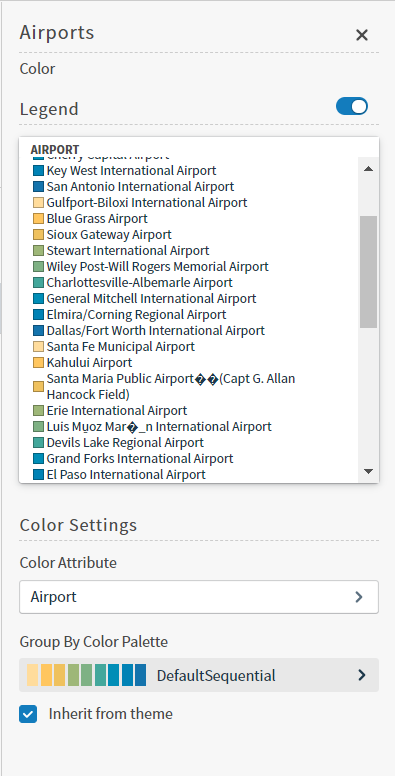
If you share your data in groups and subgroups, you can apply color attributes as needed.Specify the color settings for a specific box plot using the Color sidebar
Edit the visual you want to modify. See Edit Visuals.
If you are editing the visual in a dashboard, select Settings from the visual drop-down menu. The sidebar menu for the visual appears. If you are editing the visual from the Visual Gallery, the sidebar appears to the right of the visual.
Select on the sidebar menu. The Color sidebar for the visual appears.
Configure the color settings as described below. As you change the color settings, the legend at the top of the Color sidebar shows how the legend will appear on the visual. Supported color specifications are described in Specify Colors.
Setting
Description
Legend
Enable or disable to display a dynamic legend in this visual. Dynamic legends allow you to temporarily add or remove data shown in the visual.
For distinct color styles, select a data point in the legend to turn it off and on in the visual.
Use the color selector to manually assign colors for legend items.
If available, enable or disable a static legend for this visual.
Color Attribute
Select the attribute that affects the segment color in the visual.
Group By Color Palette
Select a color palette for this specific visual.
Select the Inherit from theme checkbox to use the color palette specified by the theme.
4. Close the Color sidebar and the color settings are dynamically applied to the visual.
Select to save the dashboard and the visual with its updated settings.
Assistant
Responses are generated using AI and may contain mistakes.


 on the sidebar menu. The Color sidebar for the visual appears.
 to save the dashboard and the visual with its updated settings.