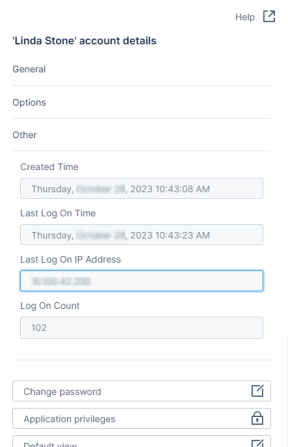
| General | ID | This user’s account ID (a GUID value). You can search for users by their ID in the user Accounts work area. |
| Account Type | If applicable, select an account type. The default is Local user. |
| Tenant | The Tenant for this user account. Not editable here. |
| Name | The login name for this user. Editable. |
| Seat Type | Select a Seat Type from the available options. |
| Seat Mode | Indicates the seat mode for this account. This may be reserved or floating. |
| Email Address | The email address associated with this user account. Editable. |
| Display Name | The user’s display name. Editable. |
| Enabled | Indicates the user account is enabled if checked, disabled if blank. Editable. |
| Notes | An editable text field; add notes about this user here. |
| Options | Culture | Enter a language code (such as en-US) for this user. If blank, defaults to Symphony’s defined culture. |
| Time Zone | This user’s time zone. Select a UTC option, or leave at Default. |
| Logon Session Idle Timeout | Define this user’s idle timeout. Format as dd.hh:mm:ss or hh:mm:ss. |
| Explicit Password Expiry Date | If defined, overrides the Days Before Password Expire setting. if Password Never Expires is enabled, this value is ignored. |
| Account Expiry Date | Define the date this account expires. |
| Allowed IP Addresses | Define the IP address or range of addresses this user must use to connect to your environment. |
| Active Project | The user’s active project. Select the edit icon to change their active project. |
| Can Change Password | Enable to allow this user to change their own password. |
| Password Never Expires | Enable to override any environment or user account password expiration dates. |
| Other | Created Time | The date and time this user account was created. Not editable. |
| Last Log On Time | The last date and time this user account connected to your environment. Not editable. |
| Last Log On IP Address | The last IP address this user account used to connect to your environment. Not editable. |
| Log On Count | The number of times this user account connected to your environment. Not editable. |
| Change password | Select to manually change this user’s password. |
| admin | Select to update this user’s application privileges. See Application Privileges. |
| Default view | Select to change this user’s default view. Defining this overrides their group default view. See Application Privileges. |
| Active logon sessions | Select to view the user’s current logged on sessions. |
| Custom attributes | Select to define the users’ custom attributes. See Custom attributes. |
| Effective custom attributes | Select to view the effective custom attributes for this user. |
| Tokens | Select to view and manage tokens associated with this user. |
| Member of | Select to view and edit the groups this user is a member of. |
<User Name>’s recycle bin | Select to view the files and folders this user has deleted and can be restored. |
Impersonate<User Name> | Select to impersonate this user and verify their user experience. Any changes you make as the user will persist. |