

View the Home Page
Easily access the home page from anywhere in the UI by selecting the Home icon ( ) in the main menu.
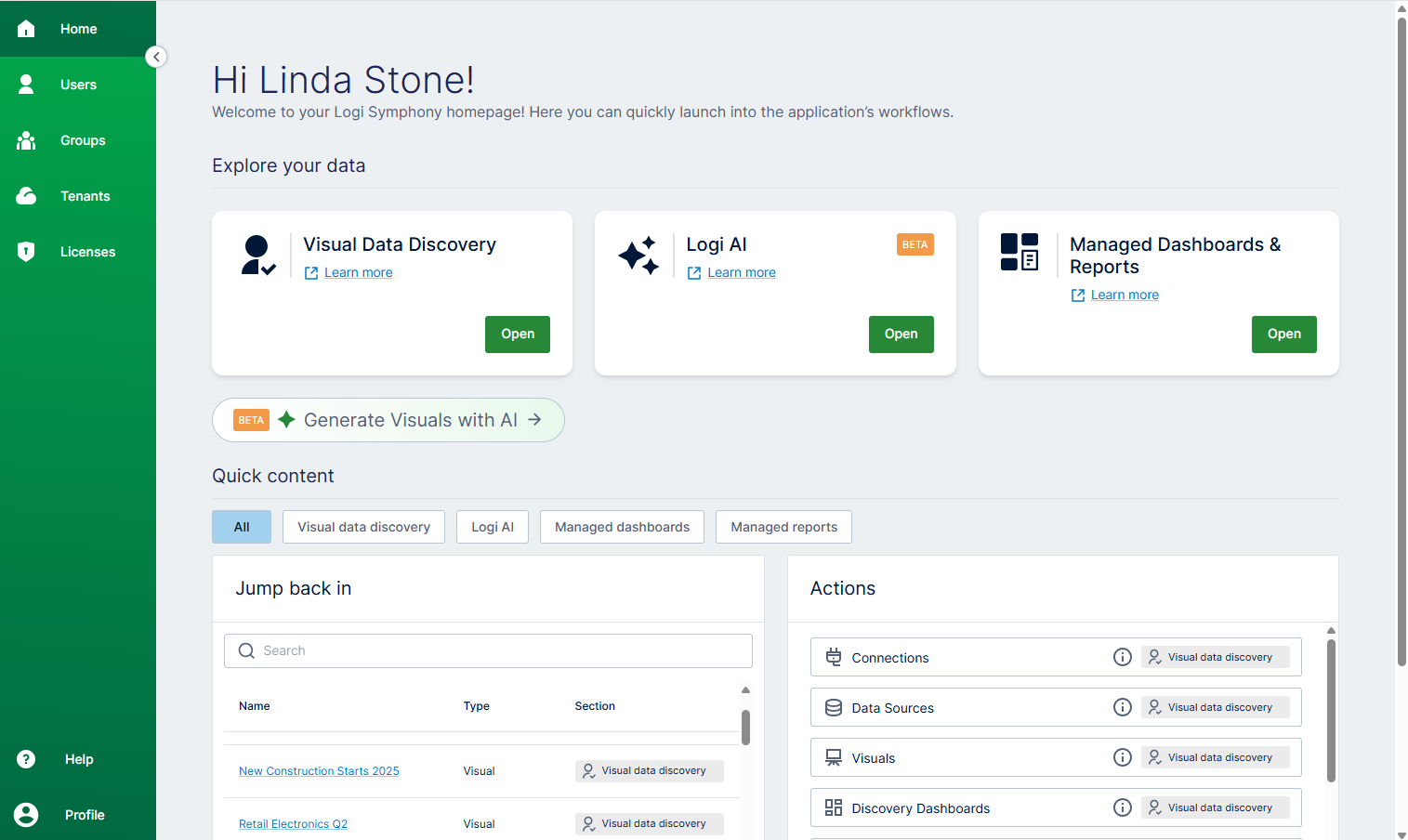
-
Explore your data work area
- Visual Data Discovery
- Logi AI
- Managed Dashboards & Reports
-
Quick content work area (filter as All , Visual data discovery, Logi AI, Managed dashboards , Managed reports)
- Jump back in
- Actions
) to return to the home page.
| Link | Description |
|---|---|
Visual Data Discovery | Select Open to navigate to the Visual Data Discoverywork area.
|
Logi AI (Beta) | Select Open to navigate to the Logi AIwork area.
|
Managed Dashboards & Reports | Select Open to navigate to theManaged Dashboards & Reportswork area. A work area showing the content and projects you can access opens. Your main menu updates to give you access to navigate to Search, Home, All content, Projects, Views, Data, Business, Help, and your Profile. |
Jump back in | Builds you a list of the most recent items you’ve accessed in Symphony.
|
Actions | Displays a list of actions you can select to perform common tasks. Use a Quick content filter to filter what you see by module. |
 ) and collapse (
  ) arrows or menu icon (
  ) to expand and collapse the main menu.