> ## Documentation Index
> Fetch the complete documentation index at: https://insightsoftware-preview.mintlify.site/llms.txt
> Use this file to discover all available pages before exploring further.
# Move, Reorder, Remove Data For A Metric Sets
export const InlineImage = ({src, href, alt = "", size = "medium", customSize, position = "left", children}) => {
const sizeClasses = {
small: "w-6 h-6",
medium: "w-8 h-8",
large: "w-12 h-12",
xlarge: "w-16 h-16"
};
const ImageComponent = () =>  ;
const imageElement = href ?
: ;
return <>
{position === "left" && imageElement}
{position === "left" && " "}
{children}
{position === "right" && " "}
{position === "right" && imageElement}
;
};
This applies to: *Managed Dashboards, Managed Reports*
To move data between Rows, Slicers, and Columns, drag it from where it is placed already in the Data Analysis Panel to the new area where the label *drop a hierarchy* appears.
To change the order of multiple items placed under the same heading, drag a lower item and drop it where you want it located.
;
const imageElement = href ?
: ;
return <>
{position === "left" && imageElement}
{position === "left" && " "}
{children}
{position === "right" && " "}
{position === "right" && imageElement}
;
};
This applies to: *Managed Dashboards, Managed Reports*
To move data between Rows, Slicers, and Columns, drag it from where it is placed already in the Data Analysis Panel to the new area where the label *drop a hierarchy* appears.
To change the order of multiple items placed under the same heading, drag a lower item and drop it where you want it located.
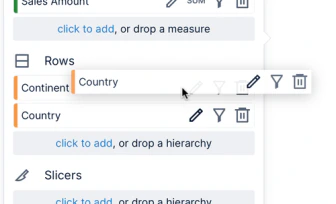 The order of hierarchies determines their grouping order. The order of measures determines their sorting priority when sorting by more than one measure.
Click the delete button to the right of the hierarchy or measure to remove it from the metric set.
The order of hierarchies determines their grouping order. The order of measures determines their sorting priority when sorting by more than one measure.
Click the delete button to the right of the hierarchy or measure to remove it from the metric set.